
There was a time when business decisions were made based on gut instinct, personal experience, and a dash of luck. But as the digital revolution took hold, a new era of data-driven decision-making emerged. At the forefront of this transformation is Microsoft’s Power BI, a tool that epitomizes the evolution of business intelligence. Discover how Power BI can turn your data challenges into opportunities for growth and insight.
Why Power BI Is a Game Changer
Power BI is a comprehensive suite of business analytics tools designed to present data in a visually engaging manner and disseminate insights across your organization. It is part of Microsoft’s Power Platform. What sets Power BI apart is its unparalleled user experience; it’s crafted to be intuitive, making advanced data manipulation accessible to users without a technical background. Here’s a glimpse into why Power BI is quickly becoming the go-to choice for professionals:
- Ease of Use: Its intuitive interface allows for the creation of detailed reports and dashboards in mere minutes.
- Vivid Visualizations: Power BI offers a wide array of visualization options, enabling users to bring their data to vivid life.
- Real-Time Insights: The platform ensures your data is always up-to-date, allowing for decisions to be made based on the most current information available.
The Core Components of Power BI
Delving deeper into Power BI reveals that it is more than just a singular tool; it is a suite of applications, each with a specific role in the process of data analysis and reporting. The primary components include:
- Power BI Desktop: This is the cornerstone for creating detailed reports and data models.
- Power BI Service: An online service facilitating the sharing and collaboration on reports.
- Power BI Mobile: Ensures that your data is accessible on the move with dedicated apps for iOS, Android, and Windows platforms.
Power BI Desktop leverages two distinct languages:
- M Language for data extraction, transformation, and loading.
- DAX (Data Analysis Expressions) for advanced analysis in relational data models.
Transforming Data with M Language
M language powers the data transformation capabilities of Power BI through the Power Query Editor, which is also referred to as the back-end of Power BI. It allows for:
- Custom Data Shaping: M language facilitates precise and custom data transformations, ensuring your analysis fits your exact needs.
- Consistent Refreshes: Automate and apply data transformations consistently with scripts that update each time your data does.

For most standard data transformation tasks, you do not need to write M yourself, thanks to the application’s user-friendly interface. The graphical user interface (GUI) of the Power Query Editor provides an intuitive point-and-click experience that generates M code in the background.
Empowering Insights with DAX
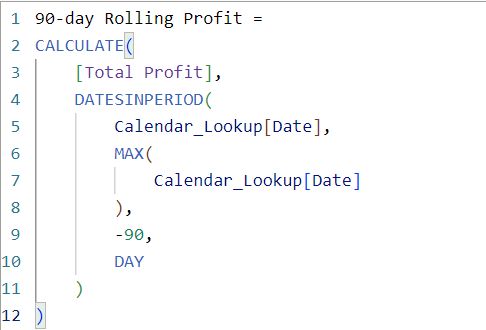
Data Analysis Expressions (DAX), used in the front-end of Power BI, are at the heart of creating dynamic and sophisticated analyses. DAX offers a way to derive new information from existing data in your model, enabling:
- Advanced Calculations: Perform intricate calculations like time-based comparisons, enhancing your ability to extract meaningful insights.
- Responsive Measures: Develop measures that adapt dynamically, offering agility in report and dashboard creation.
How Power BI Reinvents Data Analysis
What truly sets Power BI apart as a revolutionary tool is its ability to simplify the complexities inherent in data analysis:
- Seamless Data Integration: Connect effortlessly with a variety of data sources, from files and databases to online services and beyond.
- Custom Dashboards: Personalize your dashboard to spotlight the metrics and data that are most critical to your needs.
- Collaboration and Sharing: Power BI makes it easy to share insights, ensuring that decision-making is a collaborative and informed process.
A Peek into Power BI’s Magic Box
Let’s take a closer look at some of the nifty features that Power BI offers:
- Q&A Feature: Ask questions about your data using natural language.
- Custom Visuals: Go beyond the built-in visuals by creating your own or using those created by the Power BI community.
- Data Flow Creation and Automation: Streamline data management with automated data flows for sourcing, transformation, and loading.
- Integration with Python and R: Leverage Python and R for advanced analytics, including predictive models and custom visuals.
Real-World Impact of Power BI
The proof of Power BI’s effectiveness lies in the success stories of businesses of all sizes. Organizations ranging from nimble startups enhancing their marketing strategies to global enterprises optimizing their supply chains have seen substantial benefits from integrating Power BI into their operations.
Taking Your First Steps with Power BI
Starting with Power BI might seem overwhelming, but it’s an adventure worth embarking on. Begin with the basics and gradually expand your skills. The Power BI community is an invaluable resource, offering tutorials and forums that foster a supportive learning environment.
Power BI demystifies data analysis, making it accessible and actionable for businesses and individuals alike. By taking advantage of its comprehensive tools, intuitive features, and the supportive community, you’ll unlock the potential to make data-driven decisions that propel your organization forward.

 TechOply